 QR Code Scanner
To check what's really in a food product, scan its barcode with a food scanner app. You'll instantly see its Nutri-Score (A–E nutritional grade), NOVA processing level, Green-Score environmental rating, and exact levels of fat, sugar, salt and calories — before the product goes in your cart.
Food labels are designed to sell, not to inform. "Natural," "high in protein," "no added sugar" — the marketing on the front rarely matches the ingredient list on the back. Scanning the barcode skips the marketing entirely and shows you standardized, comparable scores in about one second.
Scan your groceries in 3 steps
- Open the scanner in the QR Code Scanner * Barcode Reader app.
- Scan the product barcode — the EAN/UPC code on the packaging.
- Read the scores. The product appears with its Nutri-Score, NOVA level, Green-Score and a full nutrient panel per 100 g.
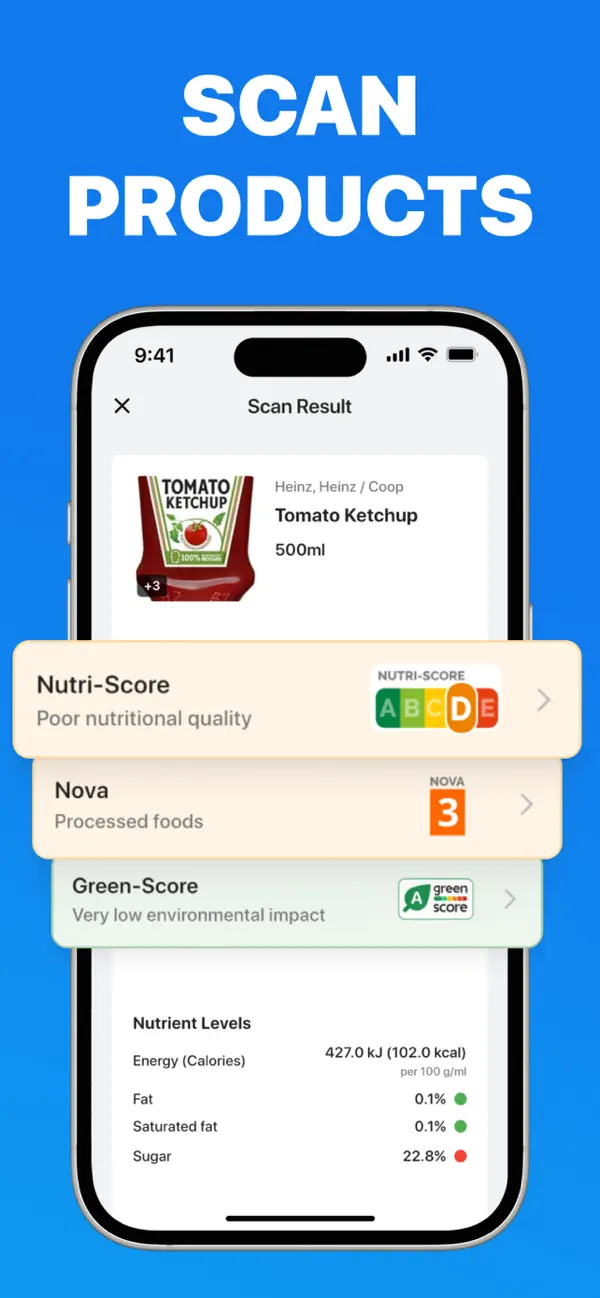
What the three scores actually mean
Nutri-Score: nutritional quality (A–E)
Nutri-Score is the color-coded grade used across European supermarkets. It weighs the good (fiber, protein, fruit/veg content) against the bad (calories, sugar, salt, saturated fat) per 100 g and produces a single letter: A (dark green, best) to E (red, worst). It's most useful for comparing products in the same category — two yogurts, two cereals, two sauces.
NOVA: how processed is it? (1–4)
NOVA ignores nutrients and asks a different question: how industrially processed is this food? Group 1 is unprocessed or minimally processed (fruit, milk, rice); group 4 is ultra-processed (sodas, packaged snacks, reconstituted meats). Research keeps linking diets heavy in NOVA 4 foods to poorer health outcomes, so many shoppers now treat the NOVA number as seriously as calories.
Green-Score: environmental impact (A–E)
Green-Score (formerly Eco-Score) estimates a product's environmental footprint across its life cycle — farming, processing, packaging, transport. If two products tie on nutrition, the Green-Score is a good tiebreaker.
How to use scores without obsessing
- Compare within categories — a Nutri-Score D chocolate isn't "banned," it's just not something to pick over a B alternative that tastes the same.
- Watch NOVA for daily staples. The bread, cereal and snacks you eat every day matter more than an occasional treat.
- Check the nutrient panel when a score surprises you — the app shows exactly which number (usually sugar or salt) dragged the grade down.
Scores simplify by design; they're a fast filter, not a diet. But as a two-second habit while shopping, scanning beats squinting at ingredient lists in every way.
Know what you're eating before you buy it
Nutri-Score, NOVA, Green-Score and full nutrition facts — one free scan away. No ads, no account.
Frequently asked questions
What is a good Nutri-Score?
A and B indicate good nutritional quality; D and E signal high sugar, salt or saturated fat per 100 g. Use it to compare products within the same category.
What does the NOVA score mean?
NOVA classifies processing from 1 (unprocessed) to 4 (ultra-processed). Lower is generally better, especially for foods you eat daily.
Is this a free alternative to Yuka?
The app covers the same ground — food and cosmetic scanning with Nutri-Score, NOVA and ingredient risks — and adds QR scanning, code creation and price comparison. Free, with no ads.